HITL Approval Gates
HITL Approval Gates let you route high-risk AI decisions to a human approval queue using the require_approval workflow action. When a workflow step triggers this action, execution pauses until a human approves or rejects the request via the API.
Creating approval entries requires a Professional, Enterprise or Enterprise Plus license. On Community and Evaluation a require_approval action still holds the workflow step but creates no queue entry, and the response carries approval_enqueue: "tier_disabled" with no approval_id. The approve, reject and pending-listing endpoints remain reachable on Evaluation so a deployment that already holds entries can finish them - see Resolve-only on Evaluation below.
This page focuses on the workflow-facing approval API. If you want the broader conceptual overview, operating model, and enterprise queue context, see Human-in-the-Loop.
HITL Approval Gates require a Professional, Enterprise or Enterprise Plus license. A free Evaluation License does not include creating them: a require_approval policy still holds the request, but no reviewer entry is created. Entries that already exist stay approvable, rejectable and listable, and still expire on schedule. To validate approval-driven workflows, use the paid Production Program.
How It Works
- A workflow step triggers the
require_approvalaction (via policy enforcement or explicit step configuration) - The request enters the approval queue with status
pending - A human reviewer calls the approve or reject endpoint
- If no action is taken within the configured TTL (24 hours by default), the request is auto-rejected and the workflow is aborted
- The workflow resumes or aborts based on the decision
This is the most practical way to add human control to multi-agent workflows. Instead of putting a human in front of every step, you only pause the steps where the decision genuinely carries business, regulatory, or security risk.
Workflow Step
    │
    ▼
require_approval triggered
    │
    ▼
┌──────────────────────┐
│  Approval Queue      │
│  status: pending     │
│  expires: 24h (eval) │
└──────────┬───────────┘
           │
     ┌─────┴─────┐
     ▼           ▼
  Approve     Reject / Expire
     │           │
     ▼           ▼
  Resume      Abort
  workflow    workflow
Retries While Approval Is Pending
If your agent calls /gate again on the same step while the request is still waiting on a reviewer, the response keeps returning the require_approval decision. It also carries a retry_context object that makes the situation unambiguous:
retry_context.gate_countincrements on every gate call, so the agent can detect retriesretry_context.last_decisionstays"require_approval"until the approval is actionedretry_context.prior_completion_statusstays"gated_not_completed"because no/completehas landed yet
After the approval is granted and execution eventually completes, a later gate call on that step shows prior_completion_status == "completed" - the signal a resumed agent can use to skip re-executing the business action.
If the policy or caller sets an idempotency_key on the first gate call, that key is bound to the approval for the step's lifetime. A subsequent gate or /complete with a different key (or no key after one was set) is rejected with 409 IDEMPOTENCY_KEY_MISMATCH before the approval is acted on, so an approved decision cannot be silently redirected to a different business transaction. See Retry Semantics & Idempotency for the full field reference and mismatch rules.
Tier Comparison
| Capability | Community | Evaluation | Enterprise |
|---|---|---|---|
require_approval action on a workflow step gate | Blocks (no queue) | Blocks (no queue) | Queued |
require_approval action on the agent planes (/api/request, /api/policy/pre-check, /api/v1/decide) | Not applied (see note below) | Blocks (no queue) | Blocks and queues a reviewable entry; an approval admits one retry |
| Max pending requests | -- | -- | Unlimited |
| Expiry behavior | -- | -- | Configurable TTL, 24h default |
WCP workflow-scoped approve/reject (/api/v1/workflows/.../approve|reject) | -- | Resolve-only (see note) | ✅ |
MAP plan-scoped approve/reject (/api/v1/plans/.../approve|reject) | -- | Resolve-only (see note) | ✅ |
Cross-plane response parity (same retry_context, approval_id, policies_matched) | -- | -- | ✅ |
WCP-plane pending listing (GET /api/v1/workflows/approvals/pending) | -- | Resolve-only (see note) | ✅ |
MAP-plane pending listing with plan_id (GET /api/v1/plans/approvals/pending) | -- | Resolve-only (see note) | ✅ |
?plan_id= filter on MAP pending listing | -- | -- | ✅ |
| Severity metadata on approvals (derived or explicit) | ✅ | ✅ | ✅ |
| Filter queue by severity | -- | -- | ✅ |
| Customer Portal UI | -- | -- | ✅ |
| Portal queue covers workflow-step and decide-plane approvals | -- | -- | ✅ (v9.19.0 and later) |
| Multi-level approval | -- | -- | ✅ |
| Auto-approve low-risk after delay | -- | -- | ✅ |
| SLA escalation for critical risk | -- | -- | ✅ |
The approve, reject and pending-listing endpoints stay reachable on Evaluation so that a deployment which held pending approvals before the tier lost the entitlement can still drain them, and so its 24-hour expiry sweeper still runs. What Evaluation cannot do is create NEW entries: a require_approval policy holds the request and reports approval_enqueue: "tier_disabled" with no approval_id. The entitlement governs what the platform creates, not what an operator can finish.
Creating approval entries requires Professional or above; all three entitled tiers get the same queue, with no pending-approval cap. What differs is the reviewer experience: Professional is API-only, while the Portal UI, multi-level approval, auto-approve and SLA escalation rows above are carried by Enterprise and Enterprise Plus. Those four are gated by build and deployment configuration rather than by a tier limit, so they are not affected by the licence tier alone.
Upgrading from a release where Evaluation created approvals
Evaluation was entitled to create approval entries before this change. If you are upgrading such a deployment, nothing you already hold is deleted or rejected: existing entries stay listable, approvable and rejectable, and the expiry sweeper still runs. Only the creation of new entries stops.
Inventory what you hold before upgrading:
SELECT org_id, request_type, status, count(*)
  FROM hitl_approval_queue
 GROUP BY org_id, request_type, status
 ORDER BY count DESC;
Run this as the table owner or axonflow_platform_admin.
hitl_approval_queue has row-level security enabled with a policy of
org_id = get_current_org_id(), and get_current_org_id() reads a session
setting that is NULL when unset. org_id = NULL is NULL, so on the application
role with no scope set this query returns zero rows and no error - an
all-clear built from nothing. To run it on the application role, set the scope
first:
SET LOCAL app.current_org_id = '<your-org-id>';
If the inventory shows pending wcp_step_gate entries and you intend to keep
creating them, move to Professional or above before upgrading. If you do not,
drain the queue at your own pace after upgrading - there is no deadline, and
the entries do not become unreachable.
Approvals created by a needs_approval verdict on POST /api/v1/decide used to be reachable only through the API. Since v9.19.0 the Enterprise portal's Approvals page renders them in the same queue as workflow step approvals, with a plane badge on every row and approve and reject routed per plane. See Enterprise Portal Approval Queue. This page's API surfaces are unchanged.
require_approval hold raises a reviewable entry since v10.0.0A require_approval policy that fires on POST /api/v1/decide, POST /api/request or POST /api/policy/pre-check holds the caller and, on a Professional or higher licence, raises an approval-queue entry for the hold; the /api/request and /api/policy/pre-check responses name it in approval_request_id. An approval is single use: it admits one retried request from the held principal within the grant window (15 minutes by default, configurable with AXONFLOW_HITL_GRANT_TTL_SECONDS), then it is spent. An empty approval_request_id on a held response is meaningful: it means no reviewer will see the request (the pending cap was reached, the tier has no queue, or the write failed), so treat it as a refusal rather than as something pending. Below Professional the hold still applies but no entry is created, and on all three planes the action is skipped altogether when the deployment runs with DEPLOYMENT_MODE=community: the request is not held at all. Before platform v10.0.0, only a Fraud and Risk-attributed step-up ever queued on these planes. Full breakdown: What does not reach this queue.
API Reference
List Pending Approvals - WCP Plane
Returns all steps currently waiting for human review across WCP workflows for the caller's tenant.
curl -X GET "http://localhost:8080/api/v1/workflows/approvals/pending"
Response:
{
  "pending_approvals": [
    {
      "workflow_id": "wf-abc-123",
      "step_id": "step-2",
      "step_index": 1,
      "step_name": "risk-assessment",
      "step_type": "tool_call",
      "decision": "require_approval",
      "approval_status": "pending",
      "created_at": "2026-03-01T10:30:00Z"
    }
  ],
  "count": 1
}
| Field | Type | Description |
|---|---|---|
pending_approvals | array | Steps awaiting approval across all planes for the tenant |
count | integer | Total matching entries (ignores limit) |
This is the workflow-centric listing: it is the queue you reach for when governed workflow steps need review. For MAP-backed plans, use the plane-scoped listing below to get plan_id populated on every entry. Enterprise also exposes a broader HITL queue surface (/api/v1/hitl/queue) for richer reviewer operations that are plane-neutral.
List Pending Approvals - MAP Plane
Returns the same shape scoped to MAP-backed workflows only (workflows that were created by MAP confirm / step mode and carry a plan_id in metadata). Every entry has plan_id populated - the one intentional asymmetry with the WCP listing above, mirroring the approve/reject asymmetry in the HITL parity rule (ADR-046).
# All MAP-plane pending approvals for the tenant
curl -X GET "http://localhost:8080/api/v1/plans/approvals/pending"

# Scoped to a single plan
curl -X GET "http://localhost:8080/api/v1/plans/approvals/pending?plan_id=plan-abc123"
Response:
{
  "pending_approvals": [
    {
      "workflow_id": "wf-map-456",
      "workflow_name": "map-confirm-plan-abc123",
      "plan_id": "plan-abc123",
      "step_id": "step_0_analyze",
      "step_index": 0,
      "step_name": "Analyze customer transaction",
      "step_type": "tool_call",
      "decision": "require_approval",
      "approval_status": "pending",
      "created_at": "2026-04-22T10:00:00Z"
    }
  ],
  "count": 1
}
Reachable on Evaluation and above (same tier gate as the MAP step approve/reject endpoints). Listing what is pending is a read over work that already exists, so it follows the resolve rule rather than the creation entitlement. Reviewer integrators that need to render plan context can read plan_id directly from the response without a second lookup; clients that want a plane-neutral view can use /api/v1/hitl/queue (Enterprise) instead.
Approve a Request
Approves a pending request and resumes the workflow. The approver identity is extracted from the X-User-ID header. An audit comment (minimum 10 characters) is required so every approval carries a justification into the audit log.
curl -X POST "http://localhost:8080/api/v1/workflows/wf-abc-123/steps/step-2/approve" \
  -H "Content-Type: application/json" \
  -H "X-User-ID: compliance-officer-7" \
  -d '{"comment": "Approved after full audit review of the payment intent"}'
Response:
{
  "workflow_id": "wf-abc-123",
  "step_id": "step-2",
  "decision": "allow",
  "reason": "Approved: High-value transfer requires oversight",
  "approval_status": "approved",
  "approval_id": "318a270f-7b42-5c56-a191-8dbd1bf2e1e4",
  "approved_by": "compliance-officer-7",
  "approved_at": "2026-04-22T10:05:00Z",
  "policies_matched": [
    {
      "policy_id": "f9b22075-7e59-4ba2-a31e-bb6e059ae96b",
      "policy_name": "High-Value Wire Transfer Oversight",
      "action": "require_approval",
      "risk_level": "high",
      "allow_override": false,
      "policy_description": "Require human approval on transactions above $10,000"
    }
  ],
  "retry_context": {
    "gate_count": 1,
    "completion_count": 0,
    "prior_completion_status": "none",
    "prior_output_available": false,
    "prior_output": null,
    "prior_completion_at": null,
    "idempotency_key": "payment-intent-123",
    "last_decision": "require_approval",
    "first_attempt_at": "2026-04-22T10:00:00Z",
    "last_attempt_at": "2026-04-22T10:00:00Z"
  },
  "message": "Step approved"
}
decision resolves to allow so the agent that re-calls /gate next will see the step cleared. retry_context mirrors the Retry Semantics & Idempotency shape, so reviewer tools render retry state without a second API call.
Reject a Request
Rejects a pending request and aborts the workflow. An audit reason (minimum 10 characters) is required.
curl -X POST "http://localhost:8080/api/v1/workflows/wf-abc-123/steps/step-2/reject" \
  -H "Content-Type: application/json" \
  -H "X-User-ID: compliance-officer-7" \
  -d '{"reason": "Output contains PII that was not redacted"}'
Response:
{
  "workflow_id": "wf-abc-123",
  "step_id": "step-2",
  "decision": "block",
  "reason": "Rejected: Output contains PII that was not redacted",
  "approval_status": "rejected",
  "approval_id": "318a270f-7b42-5c56-a191-8dbd1bf2e1e4",
  "rejected_by": "compliance-officer-7",
  "rejected_at": "2026-04-22T10:05:00Z",
  "policies_matched": [
    {
      "policy_id": "8b3c9e21-4f7a-4d5e-bb88-112233445566",
      "policy_name": "PII Redaction Required",
      "action": "require_approval",
      "risk_level": "high",
      "allow_override": false,
      "policy_description": "Outputs containing unredacted PII require human review"
    }
  ],
  "retry_context": {
    "gate_count": 1,
    "completion_count": 0,
    "prior_completion_status": "none",
    "prior_output_available": false,
    "prior_output": null,
    "prior_completion_at": null,
    "idempotency_key": "",
    "last_decision": "require_approval",
    "first_attempt_at": "2026-04-22T10:00:00Z",
    "last_attempt_at": "2026-04-22T10:00:00Z"
  },
  "message": "Step rejected, workflow aborted"
}
decision resolves to block and the workflow is aborted. approved_by / approved_at stay absent; rejected_by / rejected_at carry the reviewer identity.
MAP Plan-Scoped Equivalents
The multi-agent planning (MAP) API exposes the same approval shape at the plan level - reachable at Evaluation and above, consistent with the workflow-scoped endpoints. Approving or rejecting resolves an entry that already exists, so it is not gated on the creation entitlement:
# Approve a plan step
curl -X POST "http://localhost:8080/api/v1/plans/plan-abc123/steps/step_0_analyze/approve" \
  -H "Content-Type: application/json" \
  -H "X-User-ID: compliance-officer-7" \
  -d '{"comment": "Approved after full audit review"}'

# Reject a plan step
curl -X POST "http://localhost:8080/api/v1/plans/plan-abc123/steps/step_0_analyze/reject" \
  -H "Content-Type: application/json" \
  -H "X-User-ID: compliance-officer-7" \
  -d '{"reason": "Transaction flagged by compliance policy"}'

# List MAP-plane pending approvals (optionally filtered to one plan)
curl -X GET "http://localhost:8080/api/v1/plans/approvals/pending?plan_id=plan-abc123"
The MAP approve/reject response is identical to the WCP response shown above, plus a plan_id field echoing the plan path parameter. The MAP pending-list response has the same {pending_approvals, count} shape as the WCP pending-list response, with plan_id populated on every entry. Both planes project through the same helper - so a field added to any HITL response surfaces on both endpoints automatically. See ADR-046 for the parity rule.
Before v7.4.0 the MAP plan-scoped approve/reject endpoints were Enterprise-only. In v7.4.0 they were lowered to Evaluation+ to match the WCP workflow-scoped endpoints. When HITL creation became Professional-and-above, both planes kept the same resolve gate as each other: approve, reject and pending-listing remain reachable on Evaluation on the MAP plane exactly as on the WCP plane, so a reviewer tool integrating with either sees the same behaviour. What moved to Professional-and-above is the creation of new entries. MAP confirm / step execution modes (the entry-side that creates the approval-gated plan) remain Enterprise-only.
Tier Limits
| Limit | Value |
|---|---|
| Max pending approvals | unlimited |
| Auto-expiry | 24 hours (auto-reject + workflow abort) |
| Interface | API only (no Portal UI) |
| Escalation | Not available (Enterprise only) |
| Multi-level approval | Not available (Enterprise only) |
Enterprise tiers have no pending-approval cap. A require_approval action on a tier without the HITL entitlement is refused: the request is still held, and the response reports approval_enqueue: "tier_disabled" with no reviewer entry created.
Pending requests that are not acted on within the configured expiry (24 hours by default) are automatically rejected. The associated workflow is aborted and the expiry is recorded in the audit log.
Creating Policies with require_approval
Define policies that trigger human review when specific conditions are met:
curl -X POST http://localhost:8080/api/v1/static-policies \
  -H "Content-Type: application/json" \
  -H "Authorization: Basic $(echo -n 'client-id:client-secret' | base64)" \
  -d '{
    "name": "high-value-transaction-oversight",
    "description": "Require human approval on transactions flagged as high value",
    "pattern": "(amount|value|total).*\\$[1-9][0-9]{4,}",
    "action": "require_approval",
    "severity": "high",
    "category": "security-sqli",
    "priority": 900,
    "enabled": true
  }'
The endpoint is /api/v1/static-policies (hyphenated, plural). Static policies are regex-pattern policies; the shape uses a singular action string and a pattern field. See System Policy API for the full reference. For retry-aware or step-context policies, use the dynamic policy endpoint /api/v1/policies instead - see WCP Policy Configuration.
When a workflow step matches this policy, the request enters the approval queue instead of proceeding automatically.
In practice, teams usually combine this with:
- workflow step names that make reviewer intent obvious
- reviewer identity in
X-User-ID - application-side handling for rejection or expiry
- policy simulation before rollout so approval gates are not overly broad
Risk-Tiered Severity
Each approval request carries a severity level (critical, high, medium, low) that reflects the risk of the action being approved. Severity is determined in two ways:
- Explicit: set
severityin the policy'srequire_approvalaction config:
{
  "type": "require_approval",
  "config": {
    "reason": "High-value transaction requires review",
    "severity": "critical"
  }
}
- Derived: if no explicit severity is configured, it is derived from the policy check's risk score:
- Risk score >= 0.8:
critical - Risk score >= 0.5:
high - Risk score >= 0.3:
medium - Risk score < 0.3:
low
- Risk score >= 0.8:
Severity is visible in the queue listing and can be used to filter approvals:
# List only critical approvals
curl http://localhost:8080/api/v1/hitl/queue?severity=critical
In Enterprise edition, severity also drives operational automation: low-risk requests can be auto-approved after a configurable delay, and critical requests trigger escalation when they exceed an SLA threshold.
require_approval as an override action
Starting on platform v7.2.0, require_approval is also a valid action_override value when creating a session-scoped override via POST /api/v1/overrides. Before v7.2.0 the override validator silently dropped it (the allow-list was hand-written as {block, redact, warn, log}), so teams that wanted to temporarily route a specific policy's decisions into the HITL queue had to edit the policy itself. The canonical terminal-action list is now block, require_approval, redact, warn, log. See Overrides API for the full request shape.
Audit Trail
All approval gate activity is recorded in the audit log:
- Request entering the queue (with policy name, step name, metadata)
- Approval or rejection (with reviewer ID, timestamp)
- Auto-expiry events (with original request details and workflow abort)
Audit retention follows your tier limits: 14 days for Evaluation, configurable up to 10 years for Enterprise.
Enterprise: Visual Approval Dashboard
On Enterprise tier, approvals can be managed through the Customer Portal Approval Dashboard instead of API calls.
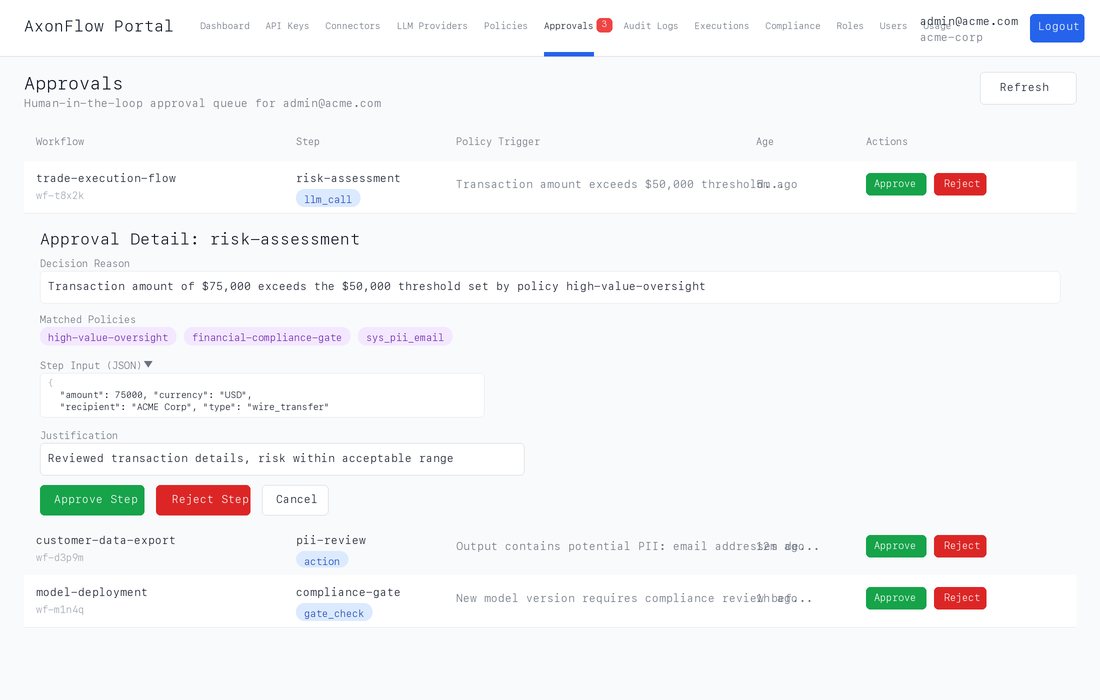
The dashboard provides:
- A live queue of all pending approvals with workflow context and policy triggers
- One-click expand to see matched policies, decision reasons, and step input JSON
- Approve/reject with mandatory justification (min 10 characters) for audit compliance
- Real-time badge count in the navigation bar (polls every 30 seconds)
- Auto-dismissing success messages and optimistic removal for responsive UX
This is the same approval API documented above, wrapped in a production-grade web interface designed for compliance officers and operations teams who need to review AI decisions without writing code.
That distinction is important commercially and operationally:
- Enterprise is where approval queues become available at all.
- Enterprise is what teams usually want once reviewers are not all engineers and the approval process itself needs to scale.
Learn more: Customer Portal
Related Documentation
- Human-in-the-Loop Overview -- Full HITL documentation including Enterprise features
- Retry Semantics & Idempotency --
retry_contextandidempotency_keybehavior on step gates, including the approval-pending retry case - Customer Portal -- Enterprise web portal with Approval Dashboard and Execution Timeline
- Policy Simulation & Impact Report -- Test policies before deploying
- Evidence Export Pack -- Export approval records for review
- Community vs Enterprise -- Full feature comparison
