Human-in-the-Loop (HITL)
Human-in-the-loop controls let AxonFlow pause a risky workflow step and wait for a person to decide whether the step should continue. This is where governance stops being "just logging" and becomes an operational control.
The core trigger is the require_approval action. You can reach it from policies, workflow gating, or orchestrated execution flows where the next step should not proceed automatically. When a step triggers it, execution pauses until a human approves or rejects the request.
This page is the single reference for HITL: when to use it, how each tier behaves, the approval APIs on both planes, SDK and webhook integration, limits and expiry, and the enterprise reviewer queue.
Creating approval entries requires a Professional, Enterprise or Enterprise Plus license. A free Evaluation License does not include it: a step that an approval would hold is withheld with decision: "block" and a reason ending (capability_requires_upgrade), and no reviewer entry is created (during a declared licence transition it is held and reports approval_enqueue: "tier_disabled" with no approval_id). Entries that already exist stay approvable, rejectable and listable, and still expire on schedule. To validate approval-driven workflows, use a Professional, Enterprise or Enterprise Plus licence: the Evaluation licence can drain an existing queue but cannot create an approval entry.
When Teams Use HITL
Typical cases include:
- financial workflows that move money, apply limits, or change risk exposure
- healthcare or legal assistants where high-risk outputs need review
- support or operations flows that can touch regulated customer data
- code or infrastructure actions where an LLM can propose a change but not execute it alone
In other words, HITL is for the places where "the model is usually right" is not an acceptable operating standard. It is also the most practical way to add human control to multi-agent workflows: instead of putting a human in front of every step, you pause only the steps where the decision genuinely carries business, regulatory, or security risk.
How a step comes to need approval on v11
In v11 policy makes a step wait for a person only through a typed requirement whose obligation is approval_challenge: one your organization publishes, or one a policy pack your deployment installs carries. The other source of a hold is execution mode, without asking the policy engine: confirm mode holds every step of a multi-agent plan, and step mode runs the first step and holds each later one. The v10.x ways of creating one are retired. The override routes (POST /api/v1/overrides and a system policy's /override) refuse every write with 409 LEGACY_POLICY_WRITE_FROZEN. The legacy policy write routes (/api/v1/static-policies, /api/v1/policies, /api/v1/dynamic-policies, /api/v1/tenant-policies and POST /api/v1/templates/{id}/apply) answer the same 409 wherever the database has revoked their writes, which it does for the application database roles. Whether or not a legacy row can still be written, no require_approval row holds a step on v11.
Approval requirements are Enterprise-only. On Community and Evaluation, publishing a document that carries approval_challenge is refused with OBLIGATION_FAMILY_NOT_IN_EDITION.
On Enterprise, the sequence is:
- Write the requirement. A document with one
requirementpolicy over the action your step presents as, carryingapproval_challengewitheligible(the groups meant to approve) andquorum. A requirement that holds a step for approval has a complete document to adapt, and explains every field. - Publish it in the customer portal, naming an approver who is not you.
POST /api/v1/typed-policies/publishunder your portal session, withapproversin the body. A publication with no approver other than its author is refused withAPPROVER_IS_AUTHOR, which is also why the Agent's/api/v1/typed-policies/publishroute cannot publish on Enterprise. - The approver promotes it.
POST /api/v1/typed-policies/promoteunder the approver's session, naming the published digest. From then on, a matching step is held.
An organization with fewer than two members who can approve can enable self-approval and publish and promote alone, recording a reason on each publication. That is an exception for a single administrator, not a step in the procedure.
A step is matched by the action its step type presents as (a tool_call or connector_call step is tool.call, an llm_call step is llm.completion, a human_task step is agent.invoke) and by who is calling. From v11.1.0 a requirement can also select a step by its name, args.context.step__name (see the step-name recipe), which applies only to steps that send a name. It cannot select a step by a value in its input, so keep checks such as an amount threshold in your application.
When a matching step reaches its gate, the gate answers require_approval and the step stays pending until a reviewer acts, through the Workflow Approval APIs below or the portal's Approvals page.
In practice, teams usually combine this with:
- workflow step names that make reviewer intent obvious
- reviewer identity in
X-User-ID - application-side handling for rejection or expiry
- policy simulation before rollout so approval gates are not overly broad
eligible and quorum are recorded on the reviewer entry, but no approve route checks the approver against them or applies separation of duties to the approval. Control who can approve through access to the approval routes and the portal's Approvals page.
Risk-Tiered Severity
Each approval request carries a severity level (critical, high, medium, low) that reflects the risk of the action being approved. From v11.1.0 a typed approval requirement can state the severity its entry carries, with the severity parameter (the field table); when several mandatory requirements hold one step, the highest wins. This applies to a held workflow step; a pending approval held on an MCP route or on /api/v1/decide is queued high. When no requirement states one, severity is derived from the platform's risk score for the step:
- Risk score >= 0.8:
critical - Risk score >= 0.5:
high - Risk score >= 0.3:
medium - Risk score < 0.3:
low
Severity is visible in the queue listing and can be used to filter approvals:
# List only critical approvals
curl http://localhost:8080/api/v1/hitl/queue?severity=critical
In Enterprise edition, severity also drives operational automation: low-risk requests can be auto-approved after a configurable delay, and critical requests trigger escalation when they exceed an SLA threshold.
How The Approval Flow Works
Once an entry exists:
- The request enters the approval queue with status
pending. - A human reviewer calls the approve or reject endpoint.
- If no action is taken before the entry's expiry, the entry expires (a timeout is recorded as
expired, never as a rejection) and the workflow is aborted. An entry created through the API expires after the configured TTL (24 hours by default). A hold raised by a typed approval requirement expires with the requirement's approval window, counted from the decision that raised it: the requirement'sexpiry_secondswhen it states one, otherwise the deployment's window (AXONFLOW_APPROVAL_TTL_SECONDS, 15 minutes when unset). Both are bounded to 60 seconds..7 days (how the window is set). - The workflow resumes or aborts based on the decision.
The important distinction is this:
- Community lets you model and detect approval-worthy situations, but it does not give you a real approval queue to action them.
- Evaluation does NOT add an approval queue. Human-in-the-Loop approvals require Professional or above.
- Enterprise turns that into an operational workflow with UI, escalation, and broader review tooling.
Tier Behavior
| Capability | Community | Evaluation | Enterprise |
|---|---|---|---|
require_approval action on a workflow step gate | Blocks (no queue) | Blocks (no queue) | Queued |
An approval requirement on the MCP routes and /api/v1/decide | -- | -- | Held as a pending approval; the retry naming it passes once (see Pending approval on MCP and decide) |
An approval requirement on /api/request and /api/policy/pre-check | -- | -- | Refused with approval_required; no queue entry (see What does not reach this queue) |
| Max pending requests | -- | -- | Unlimited |
| Expiry behavior | -- | -- | An API-created entry: configurable TTL, 24h default. A hold raised by an approval requirement: its approval window after the decision (the requirement's expiry_seconds, else AXONFLOW_APPROVAL_TTL_SECONDS, 15 minutes by default) |
WCP workflow-scoped approve/reject (/api/v1/workflows/.../approve|reject) | -- | Resolve-only (see note) | ✅ |
MAP plan-scoped approve/reject (/api/v1/plans/.../approve|reject) | -- | Resolve-only (see note) | ✅ |
Cross-plane response parity (same retry_context, approval_id, policies_matched) | -- | -- | ✅ |
WCP-plane pending listing (GET /api/v1/workflows/approvals/pending) | -- | Resolve-only (see note) | ✅ |
MAP-plane pending listing with plan_id (GET /api/v1/plans/approvals/pending) | -- | Resolve-only (see note) | ✅ |
?plan_id= filter on MAP pending listing | -- | -- | ✅ |
| Severity metadata on approvals (stated by the requirement, else derived from the risk score) | ✅ | ✅ | ✅ |
| Filter queue by severity | -- | -- | ✅ |
| Customer Portal UI | -- | -- | ✅ |
| Portal queue covers workflow-step and decide-plane approvals | -- | -- | ✅ (v9.19.0 and later) |
| Multi-level approval | -- | -- | ✅ |
| Auto-approve low-risk after delay | -- | -- | ✅ |
| SLA escalation for critical risk | -- | -- | ✅ |
The approve, reject and pending-listing endpoints stay reachable on Evaluation so that a deployment which held pending approvals before the tier lost the entitlement can still drain them, and so its 24-hour expiry sweeper still runs. What Evaluation cannot do is create NEW entries: a step that would be held is withheld with a reason ending (capability_requires_upgrade), or, during a declared licence transition, held with approval_enqueue: "tier_disabled" and no approval_id. The entitlement governs what the platform creates, not what an operator can finish.
Creating approval entries requires Professional or above; all three entitled tiers get the same queue, with no pending-approval cap. What differs is the reviewer experience: Professional is API-only, while the Portal UI, multi-level approval, auto-approve and SLA escalation rows above are carried by Enterprise and Enterprise Plus. Those four are gated by build and deployment configuration rather than by a tier limit, so they are not affected by the licence tier alone.
Community and Evaluation are still useful for engineers validating that the right steps are being flagged; once you want a queue an actual reviewer can work from, you need Professional or above.
Upgrading from a release where Evaluation created approvals
Evaluation was entitled to create approval entries before this change. If you are upgrading such a deployment, nothing you already hold is deleted or rejected: existing entries stay listable, approvable and rejectable, and the expiry sweeper still runs. Only the creation of new entries stops.
Inventory what you hold before upgrading:
SELECT org_id, request_type, status, count(*)
  FROM hitl_approval_queue
 GROUP BY org_id, request_type, status
 ORDER BY count DESC;
Run this as the table owner or axonflow_platform_admin. hitl_approval_queue has row-level security enabled with a policy of org_id = get_current_org_id(), and get_current_org_id() reads a session setting that is NULL when unset. org_id = NULL is NULL, so on the application role with no scope set this query returns zero rows and no error - an all-clear built from nothing. To run it on the application role, set the scope first:
SET LOCAL app.current_org_id = '<your-org-id>';
If the inventory shows pending wcp_step_gate entries and you intend to keep creating them, move to Professional or above before upgrading. If you do not, drain the queue at your own pace after upgrading - there is no deadline, and the entries do not become unreachable.
Workflow Approval APIs
For governed workflows, the approval surface is exposed through workflow approval endpoints on the workflow-control plane. This is the API shape most teams will use first because it fits directly into multi-agent workflow execution.
List Pending Approvals - WCP Plane
Returns all steps currently waiting for human review across WCP workflows for the caller's tenant.
curl -X GET "http://localhost:8080/api/v1/workflows/approvals/pending"
Response:
{
  "pending_approvals": [
    {
      "workflow_id": "wf-abc-123",
      "step_id": "step-2",
      "step_index": 1,
      "step_name": "risk-assessment",
      "step_type": "tool_call",
      "decision": "require_approval",
      "approval_status": "pending",
      "created_at": "2026-03-01T10:30:00Z"
    }
  ],
  "count": 1
}
| Field | Type | Description |
|---|---|---|
pending_approvals | array | Steps awaiting approval across all planes for the tenant |
count | integer | Total matching entries (ignores limit) |
This is the workflow-centric listing: it is the queue you reach for when governed workflow steps need review. For MAP-backed plans, use the plane-scoped listing below to get plan_id populated on every entry. Enterprise also exposes a broader HITL queue surface (/api/v1/hitl/queue) for richer reviewer operations that are plane-neutral.
List Pending Approvals - MAP Plane
Returns the same shape scoped to MAP-backed workflows only (workflows that were created by MAP confirm / step mode and carry a plan_id in metadata). Every entry has plan_id populated - the one intentional asymmetry with the WCP listing above, mirroring the approve/reject asymmetry in the HITL parity rule (ADR-046).
# All MAP-plane pending approvals for the tenant
curl -X GET "http://localhost:8080/api/v1/plans/approvals/pending"

# Scoped to a single plan
curl -X GET "http://localhost:8080/api/v1/plans/approvals/pending?plan_id=plan-abc123"
Response:
{
  "pending_approvals": [
    {
      "workflow_id": "wf-map-456",
      "workflow_name": "map-confirm-plan-abc123",
      "plan_id": "plan-abc123",
      "step_id": "step_0_analyze",
      "step_index": 0,
      "step_name": "Analyze customer transaction",
      "step_type": "tool_call",
      "decision": "require_approval",
      "approval_status": "pending",
      "created_at": "2026-04-22T10:00:00Z"
    }
  ],
  "count": 1
}
Reachable on Evaluation and above (same tier gate as the MAP step approve/reject endpoints). Listing what is pending is a read over work that already exists, so it follows the resolve rule rather than the creation entitlement. Reviewer integrators that need to render plan context can read plan_id directly from the response without a second lookup; clients that want a plane-neutral view can use /api/v1/hitl/queue (Enterprise) instead.
Approve a Request
Approves a pending request and resumes the workflow. The approver identity is extracted from the X-User-ID header. An audit comment (minimum 10 characters) is required so every approval carries a justification into the audit log.
curl -X POST "http://localhost:8080/api/v1/workflows/wf-abc-123/steps/step-2/approve" \
  -H "Content-Type: application/json" \
  -H "X-User-ID: compliance-officer-7" \
  -d '{"comment": "Approved after full audit review of the payment intent"}'
Response:
{
  "workflow_id": "wf-abc-123",
  "step_id": "step-2",
  "decision": "allow",
  "reason": "Approved: Step requires human approval",
  "approval_status": "approved",
  "approval_id": "318a270f-7b42-5c56-a191-8dbd1bf2e1e4",
  "approved_by": "compliance-officer-7",
  "approved_at": "2026-04-22T10:05:00Z",
  "policies_matched": [
    {
      "policy_id": "payments.approval.tool_call",
      "policy_name": "payments.approval.tool_call",
      "action": "require_approval",
      "reason": "approval_required"
    }
  ],
  "retry_context": {
    "gate_count": 1,
    "completion_count": 0,
    "prior_completion_status": "none",
    "prior_output_available": false,
    "prior_output": null,
    "prior_completion_at": null,
    "idempotency_key": "payment-intent-123",
    "last_decision": "require_approval",
    "first_attempt_at": "2026-04-22T10:00:00Z",
    "last_attempt_at": "2026-04-22T10:00:00Z"
  },
  "message": "Step approved"
}
decision resolves to allow so the agent that re-calls /gate next will see the step cleared. The response has the same shape as the step-gate response, so a reviewer tool can render the decision, policy trail, and retry state without a second API call; retry_context mirrors the Retry Semantics & Idempotency shape.
Reject a Request
Rejects a pending request and aborts the workflow. An audit reason (minimum 10 characters) is required.
curl -X POST "http://localhost:8080/api/v1/workflows/wf-abc-123/steps/step-2/reject" \
  -H "Content-Type: application/json" \
  -H "X-User-ID: compliance-officer-7" \
  -d '{"reason": "Output contains PII that was not redacted"}'
Response:
{
  "workflow_id": "wf-abc-123",
  "step_id": "step-2",
  "decision": "block",
  "reason": "Rejected: Step requires human approval",
  "approval_status": "rejected",
  "approval_id": "318a270f-7b42-5c56-a191-8dbd1bf2e1e4",
  "rejected_by": "compliance-officer-7",
  "rejected_at": "2026-04-22T10:05:00Z",
  "policies_matched": [
    {
      "policy_id": "payments.approval.tool_call",
      "policy_name": "payments.approval.tool_call",
      "action": "require_approval",
      "reason": "approval_required"
    }
  ],
  "retry_context": {
    "gate_count": 1,
    "completion_count": 0,
    "prior_completion_status": "none",
    "prior_output_available": false,
    "prior_output": null,
    "prior_completion_at": null,
    "idempotency_key": "",
    "last_decision": "require_approval",
    "first_attempt_at": "2026-04-22T10:00:00Z",
    "last_attempt_at": "2026-04-22T10:00:00Z"
  },
  "message": "Step rejected, workflow aborted"
}
decision resolves to block and the workflow is aborted. approved_by / approved_at stay absent; rejected_by / rejected_at carry the reviewer identity.
MAP Plan-Scoped Equivalents
The multi-agent planning (MAP) API exposes the same approval shape at the plan level - reachable at Evaluation and above, consistent with the workflow-scoped endpoints. Approving or rejecting resolves an entry that already exists, so it is not gated on the creation entitlement:
# Approve a plan step
curl -X POST "http://localhost:8080/api/v1/plans/plan-abc123/steps/step_0_analyze/approve" \
  -H "Content-Type: application/json" \
  -H "X-User-ID: compliance-officer-7" \
  -d '{"comment": "Approved after full audit review"}'

# Reject a plan step
curl -X POST "http://localhost:8080/api/v1/plans/plan-abc123/steps/step_0_analyze/reject" \
  -H "Content-Type: application/json" \
  -H "X-User-ID: compliance-officer-7" \
  -d '{"reason": "Transaction flagged by compliance policy"}'

# List MAP-plane pending approvals (optionally filtered to one plan)
curl -X GET "http://localhost:8080/api/v1/plans/approvals/pending?plan_id=plan-abc123"
From v11.1.0 the approve and reject routes answer on every deployment; before, they answered 503 unless the orchestrator ran with AXONFLOW_HITL_ENABLED=true, which is now ignored. The pending listing was never gated on that setting. They resolve a step held by the plan's confirm- or step-mode workflow: a plan that no such workflow backs answers 404 with No paused execution found for this plan.
The MAP approve/reject response is identical to the WCP response shown above, plus a plan_id field echoing the plan path parameter. The MAP pending-list response has the same {pending_approvals, count} shape as the WCP pending-list response, with plan_id populated on every entry. Both planes project through the same helper - so a field added to any HITL response surfaces on both endpoints automatically. See ADR-046 for the parity rule.
A reviewer tool that integrates against either plane does not need to branch on which path the request came through: the underlying workflow_steps row, retry counters, and HITL queue entry are shared between the two planes, and the unified response is the projection of that shared state. The plane-scoped pending endpoints are the reviewer-tool convenience surface; clients that want a plane-neutral view can use /api/v1/hitl/queue (Enterprise), which already sees both planes.
Before v7.4.0 the MAP plan-scoped approve/reject endpoints were Enterprise-only. In v7.4.0 they were lowered to Evaluation+ to match the WCP workflow-scoped endpoints. When HITL creation became Professional-and-above, both planes kept the same resolve gate as each other: approve, reject and pending-listing remain reachable on Evaluation on the MAP plane exactly as on the WCP plane, so a reviewer tool integrating with either sees the same behaviour. What moved to Professional-and-above is the creation of new entries. MAP confirm / step execution modes (the entry-side that creates the approval-gated plan) remain Enterprise-only.
Retries And Idempotency With Approvals
If your agent calls /gate again on the same step while the request is still waiting on a reviewer, the response keeps returning the require_approval decision. It also carries a retry_context object that makes the situation unambiguous:
retry_context.gate_countincrements on every gate call, so the agent can detect retriesretry_context.last_decisionstays"require_approval"until the approval is actionedretry_context.prior_completion_statusstays"gated_not_completed"because no/completehas landed yet
After the approval is granted and execution eventually completes, a later gate call on that step shows prior_completion_status == "completed" - the signal a resumed agent can use to reuse the prior outcome instead of re-running the business action.
If the triggering policy or the caller sets an idempotency_key on the first gate call, that key is bound to the approval for the step's lifetime. A subsequent gate or /complete with a different key (or no key after one was set) is rejected with 409 IDEMPOTENCY_KEY_MISMATCH before the approval is acted on, so an approved decision cannot be silently redirected to a different business transaction - only the transaction the reviewer actually approved can proceed. Same-workflow enforcement applies in all tiers; cross-workflow enforcement is a planned future enhancement. See Retry Semantics & Idempotency for the full field reference and mismatch rules.
Enterprise Queue Operations
Enterprise also exposes a broader approval-queue operating surface for organizations that need a more explicit review system:
POST /api/v1/hitl/queueGET /api/v1/hitl/queueGET /api/v1/hitl/queue/{id}POST /api/v1/hitl/queue/{id}/approvePOST /api/v1/hitl/queue/{id}/rejectPOST /api/v1/hitl/queue/{id}/overrideGET /api/v1/hitl/queue/{id}/historyGET /api/v1/hitl/stats
That surface is what supports broader reviewer operations, queue inspection, overrides, and richer portal experiences. It is one of the clearest examples of the difference between "I need approval gates" and "I need an approval operating model."
Creating Requests From The SDK
Each AxonFlow SDK exposes create_hitl_request (snake_case in Python / Rust, camelCase in TypeScript / Java, PascalCase in Go) so agent-framework callers can enqueue an approval row without hand-rolling the HTTP call. The full 4-step flow is:
- Gate evaluates
require_approval(viapre_check/check_tool_input). - Caller invokes
create_hitl_request(...)to enqueue the row. - Caller polls
get_hitl_request(approval_id)until the row reaches a terminal state - or suppliesnotify_urlso the platform fires a signed webhook on the transition (see Outbound Webhook Callback below). - Caller resumes the agent or denies the call based on the decision.
The required fields are client_id, original_query, and request_type. Policy attribution (triggered_policy_id, triggered_policy_name, trigger_reason), severity, the new notify_url callback, compliance metadata, and an expiry override are optional. A createHITLRequestAsync overload returning CompletableFuture<HITLApprovalRequest> is also available for non-blocking Java callers.
- TypeScript
- Python
- Go
- Java
- Rust
// TypeScript (v8.3.0+)
import { AxonFlow, HITLCreateInput } from '@axonflow/sdk';

const client = new AxonFlow({ endpoint: 'https://agent.example.com', /* ... */ });

const req = await client.createHITLRequest({
  client_id: 'loan-desk',
  original_query: 'disburse $50000 to cust-001',
  request_type: 'adk-tool',
  triggered_policy_id: 'loan-amount-cap',
  triggered_policy_name: 'Loan amount cap',
  trigger_reason: 'Disbursement above $10k requires manager approval',
  severity: 'high',
  notify_url: 'https://workflows.example.com/hooks/loan-approve',
});
console.log(req.request_id);
# Python (v8.3.0+)
from axonflow import AxonFlow
from axonflow.hitl import HITLCreateInput

async with AxonFlow(endpoint="https://agent.example.com") as client:
    req = await client.create_hitl_request(
        HITLCreateInput(
            client_id="loan-desk",
            original_query="disburse $50000 to cust-001",
            request_type="adk-tool",
            triggered_policy_id="loan-amount-cap",
            triggered_policy_name="Loan amount cap",
            trigger_reason="Disbursement above $10k requires manager approval",
            severity="high",
            notify_url="https://workflows.example.com/hooks/loan-approve",
        )
    )
    print(req.request_id)
// Go (v8.3.0+)
import axonflow "github.com/getaxonflow/axonflow-sdk-go/v9"

client := axonflow.NewClient(axonflow.AxonFlowConfig{
    Endpoint: "https://agent.example.com",
})
req, err := client.CreateHITLRequest(axonflow.HITLCreateInput{
    ClientID:            "loan-desk",
    OriginalQuery:       "disburse $50000 to cust-001",
    RequestType:         "adk-tool",
    TriggeredPolicyID:   "loan-amount-cap",
    TriggeredPolicyName: "Loan amount cap",
    TriggerReason:       "Disbursement above $10k requires manager approval",
    Severity:            "high",
    NotifyURL:           "https://workflows.example.com/hooks/loan-approve",
})
if err != nil {
    log.Fatal(err)
}
fmt.Println(req.RequestID)
// Java (v8.3.0+)
import com.getaxonflow.sdk.AxonFlow;
import com.getaxonflow.sdk.AxonFlowConfig;
import com.getaxonflow.sdk.types.hitl.HITLTypes.HITLApprovalRequest;
import com.getaxonflow.sdk.types.hitl.HITLTypes.HITLCreateInput;

AxonFlow axonflow = AxonFlow.create(
    AxonFlowConfig.builder().endpoint("https://agent.example.com").build());

HITLApprovalRequest req = axonflow.createHITLRequest(
    HITLCreateInput.builder()
        .clientId("loan-desk")
        .originalQuery("disburse $50000 to cust-001")
        .requestType("adk-tool")
        .triggeredPolicyId("loan-amount-cap")
        .triggeredPolicyName("Loan amount cap")
        .triggerReason("Disbursement above $10k requires manager approval")
        .severity("high")
        .notifyUrl("https://workflows.example.com/hooks/loan-approve")
        .build());
System.out.println(req.getRequestId());
// Rust (v0.5.0+)
use axonflow_sdk_rust::{AxonFlowClient, AxonFlowConfig, HITLCreateInput};

let client = AxonFlowClient::new(AxonFlowConfig::new("https://agent.example.com"))?;
let req = client.create_hitl_request(HITLCreateInput {
    client_id: "loan-desk".into(),
    original_query: "disburse $50000 to cust-001".into(),
    request_type: "adk-tool".into(),
    triggered_policy_id: Some("loan-amount-cap".into()),
    triggered_policy_name: Some("Loan amount cap".into()),
    trigger_reason: Some("Disbursement above $10k requires manager approval".into()),
    severity: Some("high".into()),
    notify_url: Some("https://workflows.example.com/hooks/loan-approve".into()),
    ..Default::default()
}).await?;
println!("{}", req.request_id);
Outbound Webhook Callback (notify_url)
When you create a HITL request via POST /api/v1/hitl/queue you can attach an optional notify_url. After the request reaches a terminal state - approved, rejected, overridden, or expired - the platform fires a signed HTTP POST to that URL. This removes the need for a polling sidecar in integrations that pause on a webhook (n8n's Wait-node "On Webhook Call" pattern, Google ADK workflows that resume from an external trigger).
Create a request with a callback:
curl -X POST "http://localhost:8080/api/v1/hitl/queue" \
  -H "Content-Type: application/json" \
  -H "Authorization: Basic $(echo -n my-org:secret | base64)" \
  -d '{
    "client_id": "loan-disbursement",
    "original_query": "Disburse 50000000 IDR to merchant MR-7281",
    "request_type": "payment_action",
    "triggered_policy_id": "high-value-disbursement",
    "triggered_policy_name": "High Value Disbursement",
    "trigger_reason": "Amount exceeds tier limit",
    "severity": "high",
    "notify_url": "https://workflow.example.com/n8n/webhook/hitl-callback"
  }'
The callback POST carries:
| Header | Value |
|---|---|
Content-Type | application/json |
User-Agent | axonflow-hitl/<version> |
X-AxonFlow-Signature | sha256=<lowercase hex HMAC-SHA256 over body> |
X-AxonFlow-Request-Id | <approval_id UUID> |
X-AxonFlow-Delivery-Id | <per-attempt UUID> |
X-AxonFlow-Event | hitl.approved / hitl.rejected / hitl.overridden / hitl.expired |
Envelope body:
{
"approval_id": "318a270f-7b42-5c56-a191-8dbd1bf2e1e4",
"status": "approved",
"decided_at": "2026-05-23T10:05:00Z",
"original_query": "Disburse 50000000 IDR to merchant MR-7281",
"request_type": "payment_action",
"severity": "high",
"decision_envelope": {
"org_id": "my-org",
"tenant_id": "loan-tenant",
"client_id": "loan-disbursement",
"triggered_policy_id": "high-value-disbursement",
"comment": "Verified with merchant; release approved.",
"justification": ""
}
}
Verifying The Signature
Always verify the signature with a constant-time comparator (do not use == on strings - that leaks timing). Node.js example:
const crypto = require('crypto');

function verifyAxonFlowSignature(rawBody, signatureHeader, signingKey) {
  if (typeof signatureHeader !== 'string' || signatureHeader === '') {
    return false;
  }
  const expected = 'sha256=' + crypto
    .createHmac('sha256', signingKey)
    .update(rawBody)
    .digest('hex');
  const a = Buffer.from(signatureHeader);
  const b = Buffer.from(expected);
  return a.length === b.length && crypto.timingSafeEqual(a, b);
}
Python example:
import hmac, hashlib

def verify_axonflow_signature(raw_body: bytes, signature_header: str, signing_key: bytes) -> bool:
    expected = "sha256=" + hmac.new(signing_key, raw_body, hashlib.sha256).hexdigest()
    return hmac.compare_digest(signature_header, expected)
Retry Behavior
The platform retries non-2xx responses (and transport errors) on a fixed exponential schedule: 5s → 30s → 5m - 4 attempts total. After the last attempt, the delivery is logged as GIVE-UP and the row stays in its terminal state. Receivers should treat the callback as best-effort and reconcile periodically via GET /api/v1/hitl/queue/{id} for any missed deliveries.
The retry loop runs entirely off-band: the approve/reject HTTP response returns the moment the database write commits. A slow or unreachable webhook receiver cannot stall the reviewer experience.
Signing Key Rotation
The signing key lives in the deployment's AXONFLOW_HITL_WEBHOOK_SIGNING_KEY env var. To rotate without dropped deliveries, your receiver should accept signatures from both the prior and new key during the overlap window matching your secret-sync cadence (typically a few minutes for cron-driven sync, longer for manual updates). When the rotation is complete, restart the agent and remove the prior key from the receiver's allowlist.
If the env var is unset, the dispatcher logs [HITL.Webhook] DROP AXONFLOW_HITL_WEBHOOK_SIGNING_KEY=unset per attempted delivery and the approve/reject response succeeds unchanged - so a misconfigured deployment will not block reviewer actions, but the receiver will never see a callback.
URL Validation
notify_url must use https:// (production) or http:// (local development inside the same VPC). Other schemes - file://, ftp://, data:, etc. - return 400 Bad Request at the API boundary, and defense-in-depth re-validation runs at dispatch time so a row inserted by any non-API path is still rejected before any outbound traffic.
Safe Retries With Idempotency-Key
POST /api/v1/hitl/queue accepts an optional Idempotency-Key HTTP header. If your workflow tool retries on transient failure (n8n's Retry on Fail, ADK's per-step idempotency, custom SDK retry loops), pass the same key on every retry and you will get back the original response byte-for-byte - no double row creation, no double audit record.
curl -X POST "http://localhost:8080/api/v1/hitl/queue" \
  -H "Idempotency-Key: n8n-exec-abc123-node-Approve" \
  -H "Content-Type: application/json" \
  -H "Authorization: Basic $(echo -n my-org:secret | base64)" \
  -d '{ ... }'
A cache hit adds an Idempotent-Replayed: true response header so your code can distinguish a replay from a fresh response if it cares. Cache rules:
- Cached for 24 hours
- 2xx and 4xx responses are cached (the deny is the idempotent answer for that exact input)
- 5xx is NOT cached so a retry can hit a fresh attempt
- Cross-tenant collisions are impossible - keys are scoped to your authenticated tenant + the specific endpoint
The same Idempotency-Key header is supported on POST /api/v1/mcp/check-input (policy decisions) and POST /api/v1/audit/tool-call (audit recording).
Key format: 1-256 characters matching ^[A-Za-z0-9_.:\-/]+$. UUIDs, workflow IDs like wf-abc-123:step-7, and namespaced node identifiers all work. A malformed key returns 400 Bad Request before the handler runs.
Recommended pattern for n8n: {$execution.id}-{$itemIndex}-{$node.name}. For ADK: {run_id}-{tool_invocation_id}. The intent is the same - produce a stable, unique-per-business-action key so retries dedupe but distinct actions get distinct rows.
Approval Limits
Approval queues are a Professional-and-above capability. The limits that apply once you have one:
| Limit | Value |
|---|---|
| Max pending approvals | Unlimited |
| Default expiry window | An API-created entry: 24 hours, configurable. A hold raised by an approval requirement: its approval window after the decision (the requirement's expiry_seconds, else AXONFLOW_APPROVAL_TTL_SECONDS, 15 minutes by default). An expired entry is recorded as expired and its workflow aborted |
| Primary interface | API (Portal UI on Enterprise) |
| Escalation and multi-level approval | Enterprise only |
Pending requests that are not acted on before their expiry expire: 24 hours by default for an entry created through the API, and the approval window after the decision for a hold raised by an approval requirement (15 minutes unless the requirement or the deployment sets another). An expired entry is recorded as expired, never as a rejection; the associated workflow is aborted and the expiry is recorded in the audit log. An approval that lapses is a deny, and a retry naming it is refused approval_expired.
An API-only approval loop is enough for pilot rollouts and pre-production workflow design. Teams usually reach for Enterprise when:
- several teams are using governed workflows at once
- reviewers need a shared UI rather than scripts
- operations wants escalation, auditability, and queue management
Audit Trail
All approval gate activity is recorded in the audit log:
- Request entering the queue (with policy name, step name, metadata)
- Approval or rejection (with reviewer ID, timestamp)
- Auto-expiry events (with original request details and workflow abort)
Audit retention follows your tier limits: 14 days for Evaluation, configurable up to 10 years for Enterprise.
What Engineers Usually Need To Design
When you add HITL to a workflow, the technical design questions are usually:
- Which steps are genuinely high-risk enough to pause?
- Who is the reviewer, and how will they be identified?
- What happens on expiry or rejection?
- Does the app need an API-only review flow, or a dedicated reviewer UI?
- Is this a one-team pilot, or something that needs a durable enterprise approval process?
AxonFlow is strongest when those answers are explicit. A good HITL deployment is not "put approvals everywhere." It is "put approvals where human judgment changes risk."
Enterprise Operating Model
Enterprise customers get a stronger review experience around the same core control:
- Customer Portal approval workflows for non-developer reviewers
- better operational visibility into pending approvals
- more sustainable review patterns once multiple workflows and teams share the same queue
- cleaner evidence for governance and compliance review
That is why Professional is the entry point for validating approval-driven workflows, while Enterprise is the fit once the approval process itself becomes part of company operations.
Enterprise Portal Approval Queue
The enterprise portal Approvals page gives reviewers a session-authenticated workspace for everything that was intentionally paused for a human, whether that pause came from a workflow step gate or from a decision-API step-up.
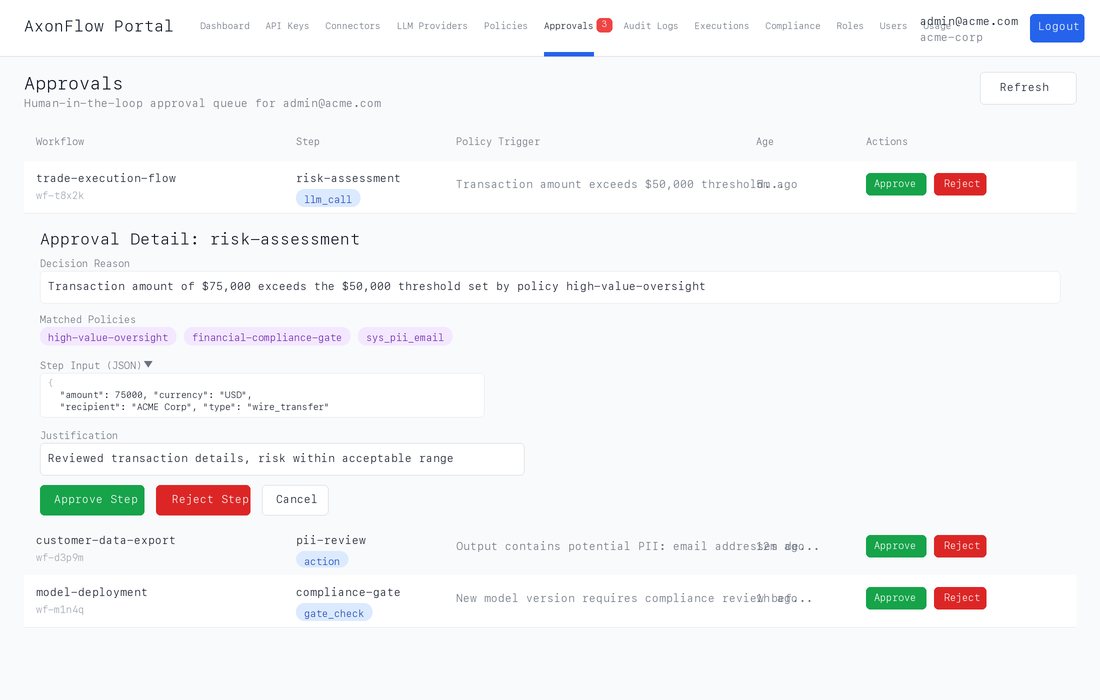
The page provides:
- A live queue of all pending approvals with workflow context and policy triggers
- One-click expand to see matched policies, decision reasons, and step input JSON
- Approve/reject with mandatory justification (min 10 characters) for audit compliance
- Real-time badge count in the navigation bar (polls every 30 seconds)
- Auto-dismissing success messages and optimistic removal for responsive UX
It is the same approval API documented above, wrapped in a web interface for compliance officers and operations teams who need to review AI decisions without writing code. Professional reviewers work the queue through the API; Enterprise is what teams usually want once reviewers are not all engineers and the approval process itself needs to scale. See Customer Portal.
One queue, both planes
Since v9.19.0, the Approvals page renders one merged list covering both approval planes:
| Plane | Where the pause comes from | Row key |
|---|---|---|
| Workflow step | A governed workflow step gate: policy, workflow design, or escalation logic paused the step instead of auto-executing it. | workflow id plus step id |
| Decide plane | An entry in the agent's approval queue (/api/v1/hitl/queue). From v11.1.0, a call held on the MCP routes or on /api/v1/decide creates one (see Pending approval on MCP and decide); /api/request and /api/policy/pre-check still refuse with approval_required (see What does not reach this queue). | request id (a UUID) |
Earlier releases showed only the workflow plane. Decide-plane step-ups existed and were actionable through the API, but never appeared on the page, so a reviewer could be looking at an empty queue while agent approvals sat pending. If you have runbooks or reviewer training that say decide-plane approvals are API-only, they need updating.
What does not reach this queue
A request that the plane cannot hold is refused. When an approval requirement matches a request on POST /api/request or POST /api/policy/pre-check, the request is refused with the reason approval_required, and the reason names the plane: approval_required: the policy engine requires an approval, and the <plane> plane has no approval hold, so it is refused rather than held. No reviewer entry is created, nothing is pending, and there is no approval to retry against. A caller that receives approval_required should treat it as a refusal.
An approval hold exists on the workflow step gate (which is also where a multi-agent plan run in confirm or step mode is held, by its mode, which asks no policy) and, from v11.1.0, as a pending approval on the MCP routes and on /api/v1/decide. The MCP response pass (check_output, and the response of /mcp/resources/query and /mcp/tools/execute) has no hold: a requirement that also binds the response refuses there with approval_required, so bind an approval requirement to the planes that hold with binds_on (see Where a requirement binds). To hold workflow steps, MCP tool calls and decide calls, and never refuse a tool's response for want of an approval: "binds_on": ["wcp", "mcp:request", "decide"].
What does not reach this queue:
- A request on
/api/requestor/api/policy/pre-check. A matching approval requirement is anapproval_requiredrefusal, as above. - A multi-agent step outside confirm and step mode. Every step of
POST /api/v1/workflows/execute, and ofPOST /api/v1/plan/executeinauto,sequential,parallelorbalancedmode, is decided by your organization's policy before it runs, on every deployment (from v11.1.0;AXONFLOW_HITL_ENABLEDis ignored). A matching approval requirement withholds the step: the call answers HTTP403with codeapproval_requires_durable_record, and nothing after it runs. A matching block answers403with codeexecution_blocked. Run the plan in confirm or step mode to have a person approve its steps. - Any request on the Community build. It has no approval queue: a matching requirement is an
approval_requiredrefusal on every agent plane, and an approval id on a retry changes nothing. The multi-agent plane is one of those planes, and the bullet above holds there instead: a challenged step is withheld withapproval_requires_durable_recordon every deployment, Community included. - A step on a deployment whose licence does not include approvals. On a workflow step gate, a step that would be held is withheld with
decision: "block", policy iddecision_enforcement_unavailableand a reason ending(capability_requires_upgrade), and no entry is created. During a licence transition the operator has declared, the step is held instead and reportsapproval_enqueue: "tier_disabled", still with no entry. Entries created before the licence changed can still be approved or rejected. - A v10.x
require_approvalpolicy. A system policy, tenant policy or override with therequire_approvalaction does not hold anything on v11. Publish an approval requirement instead.
The two planes are merged rather than split across tabs, so a pending decision is never one click away from being invisible. Every row carries a plane badge (Workflow step or Decide plane) so a step gate is never mistaken for a decision step-up, and approve and reject are routed to the plane the row came from. A pending approval held on an MCP route is an agent-queue entry, so it also carries the Decide plane badge; its request context names the plane it was held on (plane: "mcp:request") and the route. The Approvals count in the sidebar counts the same two planes the page renders, so a pending decide-plane entry raises the badge rather than sitting unseen.
The page is backed by:
| Plane | Routes |
|---|---|
| Workflow step | GET /api/v1/workflows/approvals/pending, POST /api/v1/workflows/{workflowId}/steps/{stepId}/approve, POST /api/v1/workflows/{workflowId}/steps/{stepId}/reject |
| Decide plane | GET /api/v1/hitl/queue?status=pending, POST /api/v1/hitl/queue/{requestId}/approve, POST /api/v1/hitl/queue/{requestId}/reject |
All of them are session-authenticated through the customer portal. The portal proxies only list, approve, and reject on the decide plane; queue creation, override, expiry, and history stay on the API surfaces documented above and are not reachable from this page.
Pending approval on MCP and decide
From v11.1.0, on an Enterprise deployment whose approval queue is wired, an approval requirement that matches a call on the MCP routes or on POST /api/v1/decide holds the call as a pending approval instead of refusing it:
- The call is refused, and nothing runs. The answer names the pending approval:
check_policy(the MCP server tool) answersallowed: false, ablock_reasonthat starts withapproval_pending, and apending_approvalobject;POST /api/v1/mcp/check-input,POST /mcp/resources/queryandPOST /mcp/tools/executeanswer HTTP403with apending_approvalobject;POST /api/v1/decideanswersverdict: "needs_approval"with apending_approvalobject. An enforcement point forwards only onallow, soneeds_approvalis refused by every enforcement point, including the SDKs.
- The approval appears on the portal's Approvals page. A person approves or rejects it there.
- The caller retries the same call, naming the approval in the
X-Axonflow-Approval-Idheader, or in anapproval_idfield for a client that cannot set headers (theapproval_idtool argument oncheck_policy, theapproval_idrequest field on the other routes).
The caller must also be able to carry an approval challenge: a call whose handshake does not advertise approval_challenge is refused unsupported_obligation before any hold is considered. And the call is refused approval_required with nothing queued if the deployment has no approval queue or its licence tier does not entitle one, if the organization is at its pending-approval limit, or if the identity plane did not admit the requester.
"pending_approval": {
  "approval_id": "3f2b8c1e-5d0a-5c7e-9f41-2a6b0d9c7e13",
  "status": "pending",
  "plane": "mcp:request",
  "expires_at": "2026-10-02T14:15:00Z",
  "retry": { "header": "X-Axonflow-Approval-Id", "argument": "approval_id" }
}
On decide, plane is decide and the retry field is body_field: "approval_id". While the approval is still pending, the same call again names the same approval; it does not open a second one. status is pending, or approved once a person has approved it and it is waiting for this caller's retry, so treat any pending_approval as "not allowed yet" rather than testing for pending; expires_at is omitted when the answer carries no window, as a refused retry's does.
The retry is decided like the first call. The approval can release only a call that is held again for the same approval:
| The retry is decided | What happens |
|---|---|
| Allowed | It is allowed. The approval is not spent. |
| Refused by a policy | It is refused. No approval lifts a refusal. |
| Held for approval | The approval is spent, and the call passes once, only if every condition below holds. Otherwise the retry is refused with the reason. |
The conditions for a spend:
- a person approved it (not a service credential, and not the caller itself);
- it has not expired;
- it has not been spent;
- it was granted for this exact call.
The same call means, on the MCP routes, the same connector, tool, operation, statement and parameters (and the row limit on /mcp/resources/query), from the same caller, under the same requirement. On decide it means the same stage, target, query and context: resend the same context, and keep per-request values such as request ids and timestamps in headers.
A refused retry leads with one of these reasons. The list is not closed: a retry is also refused unsupported_obligation when the permit an approval would release still carries an obligation the route cannot discharge, and evaluation_error when the spend itself fails.
| Reason | Meaning |
|---|---|
approval_pending | Nobody has decided the approval yet. Retry once a person approves it. |
approval_rejected | The approval was rejected. |
approval_already_consumed | The approval has already admitted its one call. A new call needs a new approval. |
approval_not_found | No approval with this id is visible to your organization, or the retry named two different ids — one in the header and one in the approval_id field — so it names no single approval. |
bound_input_changed | The approval was granted for a different call: other input, tool, route, caller or requirement. |
approval_reviewer_unattributed | A credential approved it, not a person. Approve it from a person's portal login. |
approval_reviewer_excluded | The caller approved its own call. |
approval_expired | The approval expired before it was spent. |
One approval, from one person. A pending approval is released by one person's approval. A requirement that asks for more - a quorum above one, or approvals from more than one clause - is not held on these planes: it is refused approval_required, with the reason that it asks for more approvals than the approval queue can count.
Expiry. The approval expires when its window, counted from the decision that raised it, ends (expires_at): the requirement's expiry_seconds when it states one, otherwise the deployment's window (AXONFLOW_APPROVAL_TTL_SECONDS, 15 minutes when unset). The window is not extended by an approval: approve and retry within it.
Every outcome is audited. The pending answer, the spend and every refusal each write an audit row that names the approval, and the queue entry's history records when it was spent (consumed).
Bind the requirement to the planes that hold. A requirement without binds_on also applies on the MCP response pass, which cannot hold, so check_output and the response of /mcp/resources/query and /mcp/tools/execute are refused approval_required. Publication warns about it (BINDS_ON_MCP_RESPONSE). Name the planes: "binds_on": ["mcp:request", "decide"], with "wcp" added to hold workflow steps too (see Where a requirement binds).
The Community build has no approval queue. A matching approval requirement there is refused with approval_required, and an approval id on a retry changes nothing.
Honest queue depth and reachability
Two reviewer-facing properties are worth knowing before you build a process on the page:
- Depth is bounded and says so. Both planes are fetched up to 100 rows. When a plane's server-side total exceeds what the page holds, the page states how many of how many it is showing rather than implying the list is complete.
- A plane that cannot be reached never reads as an empty queue. If one plane fails to load or is not served by this deployment, the page names the plane that failed and says the view may not be the whole queue. An empty state names only the planes it actually reached.
A decide-plane entry whose expiry has passed is still returned until the sweep runs. Those rows are marked and cannot be actioned, because the agent refuses a decision on an expired entry.
What A Reviewer Sees
A workflow step row can include:
- workflow ID and workflow name
- step ID, step name, and step type
- policy or decision context
- approval status
- created timestamp
- optional step input and rationale fields
A decide plane row can include:
- the request id that identifies the entry
- the policy that triggered the step-up and the reason it fired
- severity
- created timestamp and expiry
- the original query or command context, and the oversight metadata the step-up carried
That is enough context for most organizations to make an explicit decision and record why they made it.
From v11.1.0, a portal approve or reject on the decide plane records the signed-in person as the reviewer, whether or not the identity trust gate (AXONFLOW_TRUST_IDENTITY_HEADERS) is on. The portal forwards the person over its own internal-service connection to the agent, which it authenticates with the deployment's internal service secret, and the agent takes the reviewer from that connection only. The trust gate still decides whether identity headers from any other caller are believed.
A login that names no person - the deployment organization's own portal login - is recorded as a service credential, not a person. A pending approval on the MCP routes or on decide can only be spent when a person approved it, so approve those from a person's login.
Why This Matters In Enterprise Rollouts
Many teams do not want AxonFlow to choose only between “allow” and “block.” For higher-risk actions, the safer pattern is:
- detect the condition with policy or workflow logic
- pause the step
- route the decision to a person
- capture an explicit approve or reject action
This portal workflow is the reviewer-facing implementation of that pattern.
Approve Versus Reject
When a reviewer approves a step, the portal posts the action back to the workflow engine and the execution can continue.
When a reviewer rejects a step, the rejection reason becomes part of the decision trail. That is especially important for:
- code-governance reviews
- regulated workflows
- privileged downstream actions
- customer-facing automations where accountability matters
Recommended Workflow
Use the queue as part of a broader operating loop:
- open Execution Operations to find blocked or approval-pending runs
- open the Approvals Queue to review the exact paused steps
- capture reviewer justification on approve or reject
- correlate the outcome with the Audit Logging Guide and the audit trail the approval wrote
Enterprise Advice
The strongest teams treat approvals as a deliberate governance workflow, not as a fallback for unclear design. A healthy queue usually means:
- only the right classes of high-risk steps pause
- reviewers have enough context to decide quickly
- approval reasons are meaningful and searchable later
- blocking is reserved for events that should never proceed
If the queue becomes noisy, the fix is usually in workflow design or policy tuning, not in asking reviewers to click faster.
Related Documentation
- Retry Semantics & Idempotency for
retry_contextandidempotency_keybehavior on gate retries and approval-pending flows - Approvals And Exception Handling Patterns for how teams design expiry, escalation, and override workflows
- Assessing AxonFlow in Regulated Environments for the broader security and rollout path around approval-driven trials
- Customer Portal for enterprise reviewer operations, the Approval Dashboard and the Execution Timeline
- Policy Simulation & Impact Report for testing approval-triggering policies before rollout
- Evidence Export Pack for sharing approval evidence with reviewers
- Policy Overview for policy actions and authoring
- Community vs Enterprise for the full feature comparison
Rollout Checklist
Use this page as one layer of the broader governance rollout:
- decide where the rule belongs with Policy Hierarchy
- test the request path with Runtime Request Paths
- connect review workflows to the Workflow Approval APIs when a block should become a human decision
- compare Community vs Evaluation vs Enterprise when simulation, evidence export, SSO, SCIM, or portal operations become requirements
