Customer Portal
The AxonFlow Customer Portal is a full-featured web interface for enterprise AI governance operations. It gives compliance officers, engineering leads, and operations teams a single pane of glass for monitoring executions, reviewing approvals, managing policies, and tracking costs across all AI workloads.
The Customer Portal is available with AxonFlow Enterprise. Request a demo to see it in action.
Execution Timeline
The Execution Timeline provides a unified, real-time view of every MAP plan and WCP workflow execution across your organization.
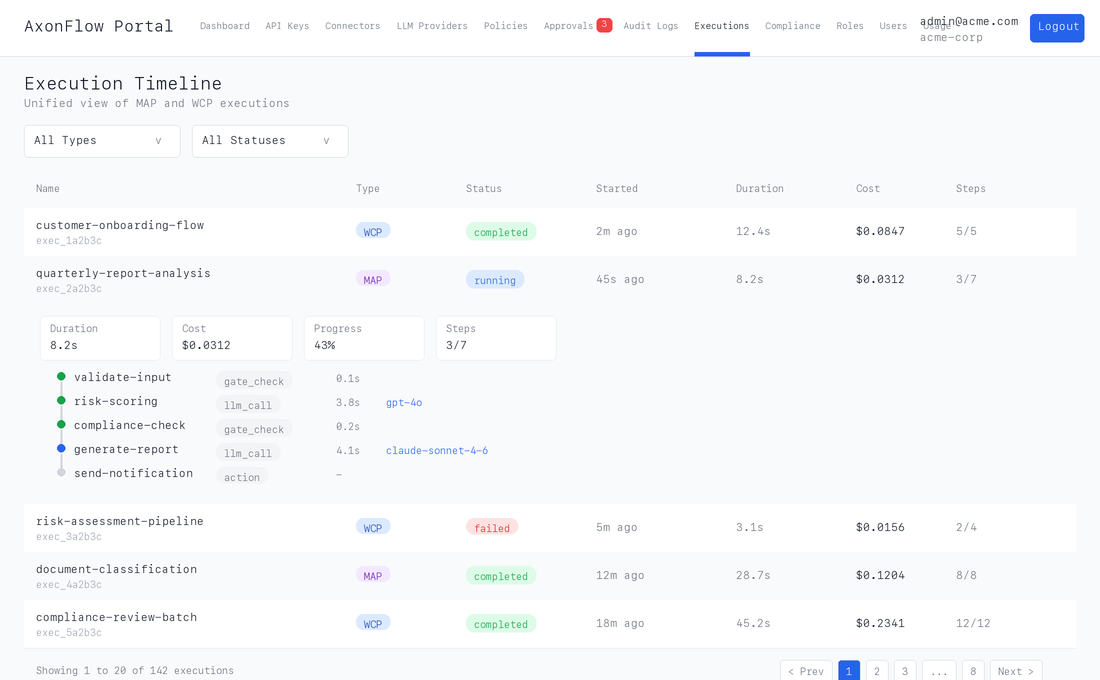
What you see at a glance:
| Column | Description |
|---|---|
| Execution name and ID | Quickly identify any execution |
| Type badge | MAP or WCP with color coding |
| Status | Live status with color-coded indicators (running, completed, failed, aborted) |
| Duration | Total elapsed time |
| Cost | Actual LLM cost in USD |
| Progress | Step progress (e.g., 3/7) |
Drill into any execution by clicking a row to expand the full step timeline inline:
- Step-by-step timeline with color-coded status dots and timing
- Policy gate decisions showing which policies matched and why a step was blocked or required approval
- LLM usage per step including model, provider, token counts, and cost
- Full input/output JSON in collapsible sections for deep inspection
- Approval status showing who approved or rejected a step, and when
Filter and paginate across thousands of executions by type (MAP/WCP) and status (pending, running, completed, failed, cancelled, aborted, expired).
Why This Matters
Without the Execution Timeline, teams rely on log aggregation, CLI tools, or raw API calls to understand what happened during an execution. The portal puts everything in one place with no setup required, accessible to both engineers and compliance reviewers.
Approval Dashboard
The Approval Dashboard is the operations center for Human-in-the-Loop (HITL) approval workflows. When a policy triggers require_approval, the step pauses and enters the approval queue, where authorized reviewers can inspect, approve, or reject it.
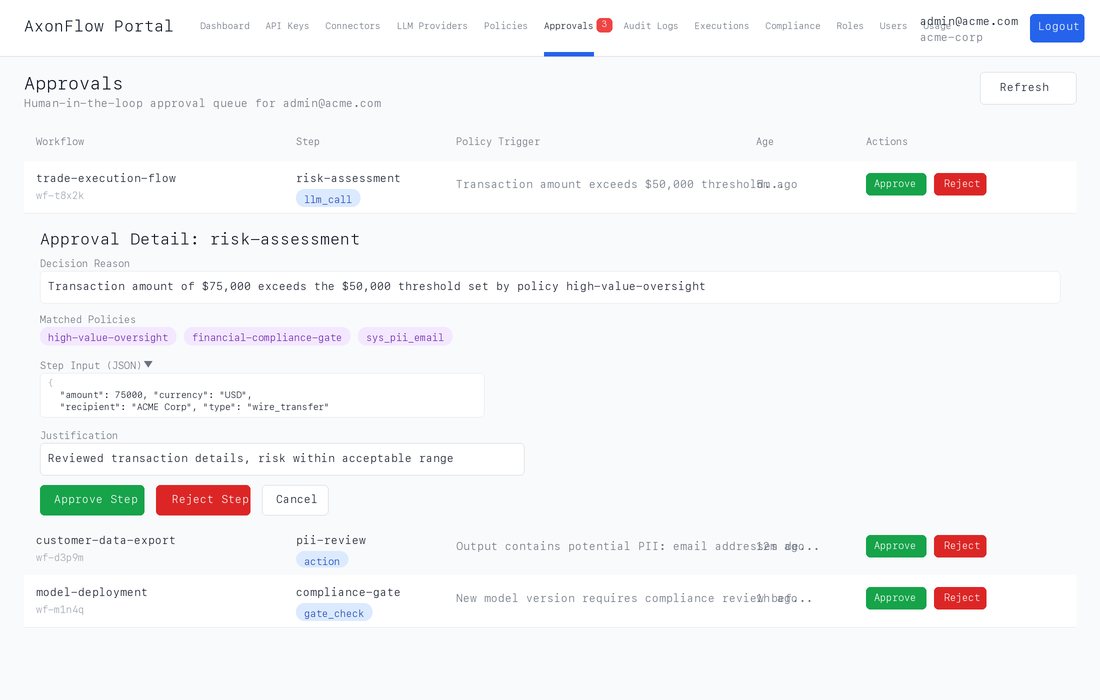
Queue at a glance:
| Column | Description |
|---|---|
| Workflow | Workflow name and ID for context |
| Step | The specific step awaiting review, with type badge |
| Policy Trigger | Why this step was flagged (decision reason) |
| Age | How long the step has been waiting |
| Actions | One-click Approve or Reject |
Expand any item to see the full detail panel:
- Complete decision reason explaining why the policy engine flagged this step
- Matched policies as purple badges showing every policy that triggered
- Step input JSON so reviewers can inspect exactly what data is being processed
- Justification form requiring a minimum 10-character explanation for audit compliance
Real-time badge count in the navigation bar shows the number of pending approvals, polling every 30 seconds so reviewers never miss a request.
Approval Audit Trail
Every approve/reject decision is recorded with:
- Who made the decision (reviewer identity)
- When it was made (timestamp)
- The justification text (minimum 10 characters)
- Which policies triggered the review
This creates a complete audit trail for regulatory compliance (EU AI Act Article 14, SEBI AI/ML, RBI FREE-AI).
Additional Portal Features
The Customer Portal also includes:
| Feature | Description |
|---|---|
| Policy Management | Create, edit, and test policies through the UI |
| API Key Management | Generate and rotate API keys |
| LLM Provider Configuration | Manage provider routing and weights |
| SEBI Compliance Dashboard | Real-time compliance status for Indian regulations |
| Usage Analytics | Cost attribution and usage trends |
| SSO Settings | Configure SAML 2.0 authentication |
| SCIM Provisioning | Automated user lifecycle management |
| Audit Logs | Searchable audit log viewer |
| Role Management | RBAC role and permission configuration |
| Active Nodes | Health monitoring for In-VPC deployments |
Access
The Customer Portal is accessible at your organization's dedicated subdomain:
https://{client}-{env}-{region}.getaxonflow.com
For example: https://banking-prod-india.getaxonflow.com
Get Started
Ready to see the Customer Portal in action?
- Request a Demo -- See the full portal with your use case
- Contact Sales -- Discuss deployment options
- AWS Marketplace -- Self-service deployment
Already a customer? Login to Enterprise Docs for complete portal documentation.
